
Magic Mouse 2 (2015)
Magic Mouse 2 (2015): the second generation of the Multi-Touch mouse, with a built-in rechargeable battery instead of AA batteries.
Specifications
| Connection | Bluetooth; automatic pairing over the Lightning cable |
|---|---|
| Power | Internal battery; charges over Lightning; about a month per charge |
| Surface | Multi-Touch surface without separate buttons; retains mechanical click and configurable primary/secondary click |
| Compatibility | Mac with Bluetooth (Apple) |
| Price (US) | USD 79 in the US (launch price) |
| Status | Discontinued; replaced by the USB-C Magic Mouse (2024) |
Announcement and availability
Apple introduced it on October 13, 2015, alongside the updated iMac family, for $79 with a Lightning cable included. Apple Newsroom, 13-10-2015
What changes and who it is for
Compared with the first Magic Mouse, it dropped AA batteries for an internal battery lasting about a month, added automatic pairing over Lightning, and used a lighter structure with fewer moving parts. Apple Newsroom
Before choosing
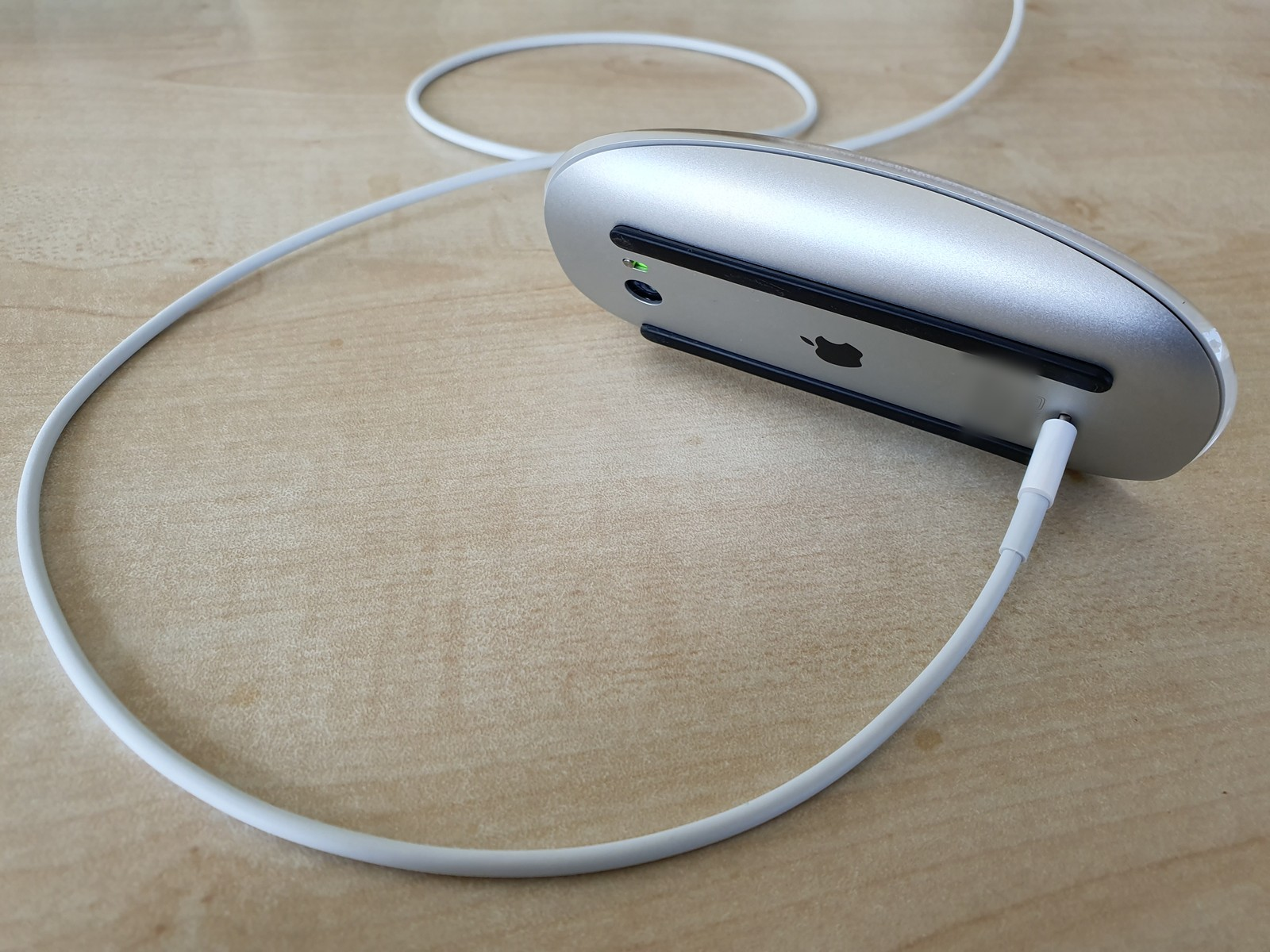
The Lightning port is on the underside, so it cannot be used while charging. The Multi-Touch surface and gestures carry over from the previous generation. Apple · Specifications
Price, foot design, charging and preservation
Apple announced immediate standalone availability on 13 October 2015 at US$79 in the United States and £65 in the United Kingdom in its two official releases. These are separate markets and currencies, not a conversion or current valuation. New iMacs included Magic Mouse 2 and Magic Keyboard; Magic Trackpad 2 was optional. Resemblance to 2009 Magic Mouse did not mean retaining the AA compartment, removable door or old status light. Apple US · 13 October 2015 · US$79 Apple UK · 13 October 2015 · £65 Andrew Cunningham · underside changes Magic Mouse (2009)
The redesigned feet have a story a specification list misses. Steven Levy’s Input Design Lab visit, published on 13 October 2015, reported Kate Bergeron and John Ternus explaining that changed mass and structure had altered the sound of gliding. He described friction-measuring and noise-locating equipment and team sample trials. Bergeron explained that reshaping the feet to ride more on their edges improved the intended feel. This is an attributed interview account, not public decibel measurements proving quieter operation on every desk. Steven Levy · 13 October 2015 · Input Design Lab interview
About a month or more on a full charge was Apple’s estimate; its release dates testing to September 2015 with preproduction devices, firmware and software alongside shipping iMacs. Andrew Cunningham in Ars Technica on 13 October also relayed Apple’s promise of roughly nine hours after a two-minute charge of a depleted mouse. That was not his nine-hour endurance test or a guarantee for every workload, temperature or aged battery. A teardown sample’s rated capacity likewise does not establish the present health of a collector’s unit. Apple · battery estimate / September 2015 testing Andrew Cunningham · Apple quick-charge promise
The original guide separates pairing from working: connect Lightning underneath and USB to the Mac, turn on until green is visible on the switch, then unplug after automatic pairing to use wirelessly. Green marks the switch position, not a new status LED. Charging accepts a Mac USB port or USB power adapter. Roman Loyola’s 19 October 2015 Macworld test explained that the mouse is inactive while charging, beyond the connector being underneath. Do not transfer Magic Keyboard 2015’s wired operation during charging to this mouse. Apple · original guide · pp. 1–3 · pairing and charging Roman Loyola · 19 October 2015 · inactive while charging
The surface senses touch, but clicking remains mechanical. Loyola described the entire top pressing down with an audible click; iFixit showed a spring, rocking mechanism and tiny switch, not a Taptic Engine. This is not Magic Trackpad 2’s Force Touch. Cunningham and Loyola liked the smoother glide without publishing a friction coefficient. Purchase judgments differ: Mike Evans in Macfilos on 13 November 2015 recommended upgrading for charging convenience; Loyola found no essential upgrade for original owners and warned of limited palm support. These are attributed preferences, not medical findings or a universal recommendation. Roman Loyola · mechanical click, glide and palm support Ron Davis / iFixit · spring and switch Andrew Cunningham · glide experience Mike Evans · 13 November 2015 · upgrade opinion
Ron Davis and contributors’ iFixit teardown, visibly dated 15 October 2015, identified A1657 and a sample battery marked 3.67 V, 7.28 Wh and 1986 mAh. Its 2/10 score concerns repair difficulty, not tracking quality: heavy adhesive hinders opening and the battery/Lightning assembly is not an AA swap. Apple states there are no user-serviceable parts and directs battery service to authorized providers. Externally it specifies a lint-free cloth, no moisture in openings, aerosols, solvents or abrasives; switching off for long disuse saves energy. The teardown does not justify removing, puncturing or heating a battery at home. Ron Davis / iFixit · 15 October 2015 · sample battery / 2 of 10 Apple · original guide · p. 4 / Battery · care and authorized service
Sources
- Apple Updates iMac Family with Stunning New Retina Displays (incluye los nuevos Magic accessories) · 13-10-2015
- Apple · Documentación de accesorios (apple.com)
More from the same family
Facts checked October 30, 2026 · Specifications